


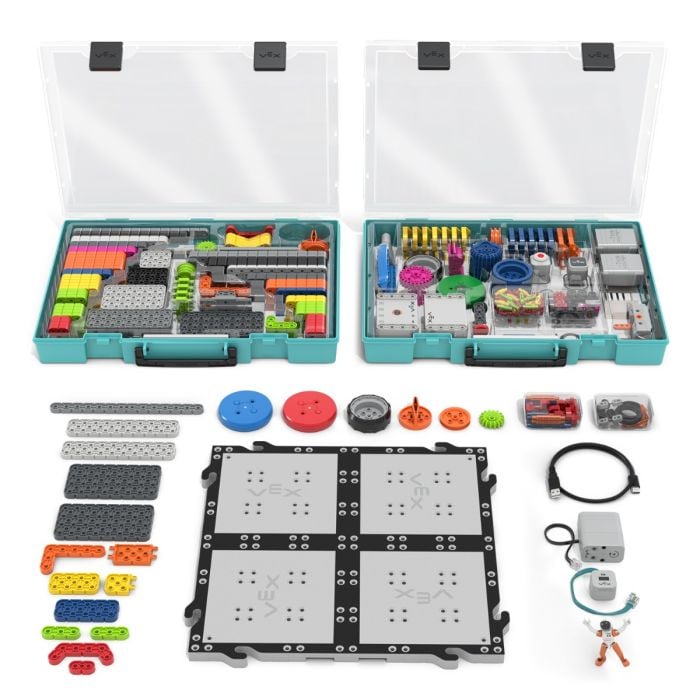
VEX GO Education Kits

Single Classroom Robot Kit
Discover VEX GO
View the VEX GO Sales Brochure
See what's in the Kit
Explore VEX GO Education Kit Details
Meet VEX GO.
An affordable construction system that teaches the fundamentals of STEM through fun, hands-on activities that help young students perceive coding and engineering in a fun and positive way!
-
Approachable: VEX GO activities encourage all students to participate.
-
Creative: VEX GO provides new ways to create and cooperate.
-
Inspiring: VEX GO unlocks a students' imagination with possibilities.
Typical Classroom Implementation Range: Recommended for grades 3-5
Continuum position: 123 → GO → IQ → EXP → V5
Construction system
-
Snap-together plastic construction system
-
Sized for small hands with low dexterity.
-
The included hand tool makes disassembly easy.
-
Color-coded components to simplify parts identification and building
-
Beam lengths identified by color, not by counting holes
-
Baseplate tile included
Classroom Hardware features
-
Organized storage system for classroom management
-
Durable components built for repeated classroom use
-
GO-specific pin colors prevent intermixing with IQ
-
279 parts, sized so a teacher can inventory a kit at a glance.
Electronics
-
Brain with built-in 6-axis inertial sensor.
-
4 Smart Ports (motors, LED Bumper, Electromagnet)
-
1 dedicated Eye Sensor port
-
1 Battery Port
-
3 Smart Motors with integrated encoders and closed-loop control
-
Eye Sensor (color and object detection)
-
LED Bumper (touch input with LED feedback)
-
Electromagnet (actuator)
-
Switch
-
Battery, USB-C rechargeable, full classroom day of use
-
All four Smart Ports are interchangeable
Builds
-
A growing library of VEX GO Builds
-
Four build categories: non-powered, rubber-band powered, motor powered, non-module
-
Build instructions and 3D instructions at builds.vex.com
Explore the Interactive VEX GO Kit of Parts
GO Robot Battery
- Internal rechargeable Lithium Iron cells
- Charged through a USB-C connector
- Charge time is 2.5 hours
- Should last a full classroom day
|
Electronics
Beams
Shafts
|
Misc.
Connectors
Wheels
|
Large Beams
Plates
Angle Beams
|
Pulleys
Gears
Pins
Disks
Standoffs
|
Curriculum Designed for How STEM Learning Grows
VEX GO gives educators flexible, standards-aligned resources that support students from their first guided building experience to increasingly independent problem-solving. Complete STEM Lab Units, flexible Activity Series, and student-facing Activities make it easy to choose the right level of structure for your students, instructional goals, and learning environment.
Explore VEX GO Curriculum
A Complete Curriculum Ecosystem
Start with the support you need. Adapt as your students grow.
Every classroom is different. Some educators want a complete instructional sequence with step-by-step facilitation guidance. Others need a short series of connected challenges or an activity students can explore more independently.
VEX GO offers multiple types of curriculum so educators can select the amount of structure and scaffolding that fits the moment. These resources can be used individually, combined into a longer learning experience, or adapted to connect with an existing curriculum.
Choose the Right Resource
STEM Lab Units
Complete, teacher-facilitated learning experiences
VEX GO STEM Lab Units function as an online teacher’s manual. Each Unit provides the materials educators need to plan, teach, and assess hands-on STEM learning, including learning goals, standards alignment, build instructions, discussion prompts, pacing guidance, facilitation strategies, and assessment opportunities.
Students build, test, code, collaborate, and explain their thinking as they investigate authentic questions and apply what they learn to new challenges.
Best for: Core classroom instruction, introducing new concepts, and educators who want comprehensive instructional support.
Explore STEM Lab Units
Activity Series
Connected challenges with flexible facilitation
VEX GO Activity Series bring several related activities together within a shared theme or context. Teacher notes provide guidance while leaving educators the flexibility to adjust the timing, level of support, and depth of exploration.
Activity Series can become a short classroom sequence, an enrichment experience, an after-school program, or a starting point for a larger student-designed challenge.
Best for: Short instructional sequences, enrichment, clubs, and flexible learning experiences.
Explore Activity Series
Activities
Student-facing challenges for exploration and extension
VEX GO Activities are one-page, student-facing challenges designed for more independent use. Step-by-step directions help students begin, while Pro Tips and Level Up prompts offer support and invite them to extend their thinking.
Activities span subjects including coding, engineering, mathematics, science, literacy, art, social studies, design, and AI literacy. Educators can use them to reinforce a concept, differentiate instruction, provide student choice, or create opportunities for continued exploration.
Best for: Learning centers, extensions, choice time, differentiation, and independent or small-group exploration.
Browse Activities
VEX Camps
Ready-made programs for camps and enrichment
VEX Camps combine STEM Lab Units, Activity Series, and Activities into ready-to-use one-, three-, and five-day programs. Camp manuals, sample schedules, welcome letters, and promotional materials help educators spend less time planning and more time creating memorable STEM experiences.
Best for: Summer programs, school-break camps, community programs, fundraisers, and extended enrichment.
Built Around Active Learning
Students learn STEM by doing STEM.
VEX GO places meaningful tools in students’ hands and gives them a reason to use them. Students do more than follow directions or complete a build. They investigate, make predictions, test ideas, use evidence, revise their work, and communicate what they have learned.
Across the curriculum, students have opportunities to:
-
Build physical models that make abstract ideas visible
-
Investigate science, mathematics, engineering, and computer science concepts
-
Develop and test coding projects
-
Solve authentic and open-ended problems
-
Collaborate and make decisions with classmates
-
Explain their strategies and reflect on their learning
-
Apply their understanding in new contexts
Hands-on materials create the experience. Purposeful questions and reflection turn that experience into learning.
Begin With One Experience. Build From There.
Whether you are planning a complete STEM unit, adding a hands-on investigation to an existing lesson, or creating an opportunity for independent exploration, VEX GO gives you a clear place to begin and room to grow.
One free app, three coding levels, same interface all the way up the VEX line. Students never re-learn the software as they move from GO to IQ to V5.
Three ways to code, same app
-
Blocks: drag-and-drop, Scratch-style. The default for GO. Available in many languages.
-
Switch: hybrid blocks that show real Python inside a block shape. The bridge from Blocks to text.
-
Python: full text coding, with a one-click Convert Blocks to Text path.
Where it runs
-
Web (recommended): codego.vex.com , nothing to install, always current, works on Chromebook, Mac, and Windows in a Chrome-based browser.
-
Desktop app: Windows and Mac.
-
Tablet app: iPad, Android, and Amazon Fire.
-
Requirements:
-
Bluetooth 4.1+ required.
-
Windows 10+, macOS 11+, ChromeOS 100+, iOS 16+, Android 9+ or FireOS 7+.
-
Tablets need a 7-inch or larger screen; storage runs 300–600 MB.
What students actually code
Commands are grouped by device, so the toolbox matches the robot:
-
Drivetrain drive and turn by distance or angle, set velocity, turn to a heading, drive until crash
-
Motion individual motors: spin, spin to position, set velocity and max torque, read position and current
-
Eye detect objects near or far, read color and hue, read brightness, control the sensor's light
-
LED Bumper detect presses, set the LED color
-
Magnet energize the electromagnet to pick up or drop
-
Inertial heading, rotation, pitch, roll, yaw, acceleration, calibrate
-
Console print values and text for debugging
-
Logic loops, conditionals, variables, operators, My Blocks
Built-in classroom features
-
Wireless Bluetooth downloads with no cables to the robot
-
Firmware updates happen automatically when the Brain connects
-
Robot Configuration for the standard builds; Code Base, Robot Arm, Super Car, or a custom robot
-
Example Projects, in-app Tutorials, and context-sensitive Help on every block
-
Auto Backup in the web version
-
Share to export a project
-
Print Console and live variable monitoring for debugging
Accessibility
-
High-contrast colors on by default
-
Read-aloud on blocks
-
Adjustable block size
-
Keyboard navigation for blocks (beta)
VEXcode VR (vr.vex.com) runs virtual robots in the browser using the same Blocks, Switch, and Python interface as VEXcode GO.
Python extras
Autocomplete, coding shortcuts, a right-click context menu, and live monitoring of variables and sensor values.
Managing a whole class
The VEX Classroom App handles 123 and GO together: name robots, monitor battery levels and usage, and update firmware on every robot at once.
Where to learn more
-
Go Coding on Web shortcut to GO web coding app
-
Go Coding API every block and Python method, with parameters and examples
-
GO Coding Library setup, connection, and troubleshooting articles
-
hoc.vex.com Hour of Code activities
-
education.vex.com STEM Labs that teach the coding progression
Ongoing professional learning, practical classroom support, and a global community help educators teach confidently with VEX GO.
Free Tier
No cost, no license required:
-
Introductory Certification Courses (for example, the VEX GO Educator Certification Course)
-
Once you are certified you get access to:
-
Professional Learning Community (connecting educators with VEX staff and peers)
-
VEX Passport: VEX Passport helps educators find and connect with VEX-certified educators around the world. Search the interactive map by location or VEX platform to exchange ideas, learn from others’ experiences, and build a personalized professional learning network
All-Access Tier (subscription)
Everything in the free tier, plus:
-
VEX Masterclasses (deeper platform-specific instruction, such as Introduction to Building with VEX GO)
-
1-on-1 sessions with VEX Educators
-
Educators Conference registration included
-
Educational Video Library (GO-specific videos covering STEM Lab walkthroughs, classroom management, and coding)
-
Educational Insights Articles (practitioner-written pieces such as Science Class Takeover with VEX GO and Python Now Available for VEX GO)
-
District-wide licenses are available through a local sales rep, not the web store.
A classroom competition, not travelling.
Events run in the room or gymnasium where students already learn; no regional qualifiers, no away trips, no registration fees.
The kit and the fields
- One SKU: 269-8115, GO Competition Field Kit
- Contents: 1 Field Element Kit · 14 Field Tiles (including 1 green and 1 red) · 22 Field Walls · 2 carrying cases
- Four themed games from the one kit:
- Ocean Science Exploration
- City Technology Rebuild
- Village Engineering Construction
- Mars Math Expedition
- Field size 3'1" × 6'1", and it separates into smaller fields. That's how one kit supports several simultaneous match stations.
- Field tiles snap together; build instructions are broken down tile by tile, and VEX recommends students build the field as part of the activity.
Robot and game rules
- One Battery, one Brain, VEX GO parts only
- Must carry the GO license plate with team name or number; decorations allowed
- Robots start on the green tile
- If a robot gets stuck, the human player may lift it onto an adjacent empty tile
- Typical robot is the Code Base 2.0 (the 3-wheel redesign)
Curriculum tie-in
Each of the four themes has its own STEM Lab unit at education.vex.com, so competition prep is instructional time rather than extra time. The Library's competition section supplies rules, mission descriptions, model examples, scoring systems, certificate templates, event-running guidance, and a competition template.
VEX GO Library
120+ articles. Available in ~28 languages
-
Start Using GO: educator entry points and per-kit unboxing paths
-
Setup: VEXcode GO install plus platform minimums per OS
-
In the Classroom: curriculum types, STEM Lab purpose and implementation
-
More Ways to Teach: facilitating building, activity series, early finishers
-
Educator Resources: the GO book, Discovery Activities, poster, printables
-
Customizing Resources: editing materials in Google Drive and Office
-
Administrator Resources: program setup, PLC support, classroom observation
-
CAD Resources: free STEP files for every part
-
Using the Kit: parts inventory, build progression, Pin Tool, part families
-
Electronics: Battery, Brain, Motors, Sensors, Switch
-
VEXcode GO: install, connect, save, configure, tutorials
-
Python: autocomplete, Switch, monitoring
-
Accessibility: read-aloud, keyboard navigation, block sizing
-
Troubleshooting: connection help, sensors, error messages, firmware
-
IT Installation: MSI installers and driver-signing certificates
-
Classroom App: usage, troubleshooting, multi-Brain firmware updates
-
GO Competitions: robot and field builds, rules, formats, events, Leaderboard
-
Cross-platform: pairing an IQ (2nd gen) or EXP Controller to a GO Brain
Accessibility Is Part of the Design
Accessibility is not something added to VEX GO for a small group of learners. It is a characteristic of a well-designed learning ecosystem. Guided by Universal Design for Learning, VEX GO recognizes that there is no “average” student and provides multiple ways for learners to engage with ideas, access information, build and code, and demonstrate what they understand. From visual, auditory, and physical access to scaffolded curriculum, professional learning, and a consistent pathway across the VEX Continuum, each part of the ecosystem is designed to remove unnecessary barriers without reducing the rigor of the learning. The goal is not simply access to robotics. It is meaningful participation, growing independence, and a genuine sense of belonging for every learner.
Universal Useability
- K-12 Continuum (meets everyone at their level)
- Professional Development Plus (ensures anyone can teach VEX)
- Professional Learning Community (connect with VEX experts, peers)
- STEM Labs (follows Universal Design for Learning guidelines)
- Competition (the excitement and drive to make learning stick)
- Library (all the VEX resources in one place)
- Translated content across the Continuum and all resources
Auditory
- Hearing Aid: Sound via speakers, headphones, or hearing aid
- Sound for button presses and robot movements
- Sound Output: Speak button presses, robot movements, code blocks and code help
- Custom sound feedback via coding
Visual
- WCAG 2.2 AA for Web content (see the ACR for details)
- WCAG 2.2 AA for software (see the ACR for details)
- Screen reader support for coding
- High contrast coding blocks
Physical Access
- VEXcode keyboard access for all features
- Robot construction with minimal dexterity and physical force
- Drive the robot with a VEX Controller
Cognitive
- 3D build instructions (helps students visualize in three dimension)
- Step through code with current code block highlighted
- Virtual robots available in VEXcode VR (reduces complexity and distractions)
Coding
- VEXcode Blocks (approachable graphical coding powered by Scratch)
- VEXcode Switch (easily transition students to textual coding)
- VEXcode Python (industry standard textual coding)
- VEXcode works on tablets and computers, web and installed
- Low bandwidth support via installed apps
- Low cost and low performance android tablet support
- Multilingual VEXcode and robot menus
VEX GO Links:
-
Teaching GO: Start-here hub of GO teaching resources
-
Product information: GO product page on vexrobotics.com
-
Pricing and quoting: Kit pricing and online quote requests
-
Contact sales: Reach a VEX sales representative
-
Library (user guides): Help articles on setup, coding, and troubleshooting
-
Build instructions: Downloadable PDF instructions for robots and models
-
Coding software: VEXcode home page with desktop and tablet downloads
-
Coding web app: VEXcode GO in the browser, nothing to install
-
API reference: Every GO block and Python command, with examples
-
Curriculum: Free STEM Labs, Activities, and pacing guides
-
Professional development: Free teacher certification plus PD+ All-Access
-
Hour of Code: One-hour coding activities for GO and VEXcode VR
-
Build library: Every curriculum build, with online 3D instructions
-
Posters: Printable classroom posters for parts and coding blocks
-
Printable rulers: Print-your-own rulers for parts sizing and measuring
-
Summer camps: Free ready-to-run camp plans, usable any time of year
GO Kit Options
- 269-6705 - VEX GO Education Kit with Storage 5.9 lbs (2.7 kgs)
add a VEX One Stick Controller
- 269-8230 - VEX One Stick Controller 0.17 lbs (0.08 kgs)